beautyfarm - THE BEST DESIGN
DOWNLOAD MY MUSIK,participa la concursuri,soft-uri,cool stuff,NIKON CLUB,Baruri Trendy,ScreenSavers,Accesorii Cool,Masini sexy,Bannere,Games,Aparitii Cinematografice,Tribal Farm...etc distreaza-te!Totul pentru TINE.Cele mai tari subiecte.
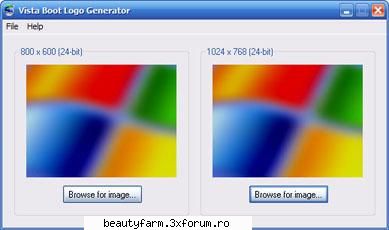
1. Download Dan Smith's Vista Boot Logo Generator. 2. Install and then run from the link in the Start Menu. 3. Hit Browse for image and select both the 800x600 and 1024x768 resolution bitmap files for your boot screen. 4. Click on File and select Save Boot Screen File as and save your file. 5. Next, you will need to replace the winload.exe.mui file in c:WindowsSystem32en-us with the one you just created. Before you copy in your new file, make a backup of the original. You will need to take ownership of all files in en-us as well as give your account file permissions to replace the file as well in order to copy the new winload.exe.mui file in. 6. The last step is to enable the alternative boot screen setting as shown in this tweak.
Enable New Boot Screen:
1. Click on the start orb and type in "MSCONFIG" in the textbox.
2. Once the System Configuration tool loads, click on the Boot tab.
3. Under Boot Options check "No GUI Boot".
4. Hit OK and reboot to see the new screen.
Right click, properties on winload.exe.mui, Security tab, click Advanced, Owner tab, click Edit, select yourself in the list, OK, OK.
Close properties window, reopen, Security tab, Edit, Full Control for yourself.