beautyfarm - THE BEST DESIGN
DOWNLOAD MY MUSIK,participa la concursuri,soft-uri,cool stuff,NIKON CLUB,Baruri Trendy,ScreenSavers,Accesorii Cool,Masini sexy,Bannere,Games,Aparitii Cinematografice,Tribal Farm...etc distreaza-te!Totul pentru TINE.Cele mai tari subiecte.
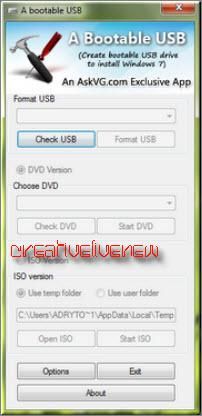
A Bootable USB Portable | 1.79 MB Creat bootable USB drive to install Windows 7 Usage: 1. Check USB 2. Format USB 3. Choose DVD or ISO 4. Open ISO 5. Wait Validation 6. Start ISO 7. Re-Boot 8. Enter Bios 9. Boot Option 10. Choose USB Drive as Boot Device 11. Done How to Use: Once you meet the requirements, run the utility. Its a portable utility so doesn't need installation. Simply run it and check the option "I have read and accepted the following License Agreement". Now click on OK button and it'll launch the main application. It also shows a Help window so that you can use the utility easily. The utility requires only 5 easy steps to follow: extract with winrar ... Check USB drive (To check whether your USB drive is attached or not) Format USB drive Choose DVD or ISO image (To copy the required files to USB drive) Start the process to create bootable USB drive
A Bootable USB Portable – poza de ADMIN-ELECTRIK_CAT, in SOFT-URI · 17.6KB





 №1
№1